
In order for us to implement the integration for you, our Uniconta consultant needs access to your system. Simply follow the steps below, and then send a confirmation to your regular contact person at Risika.
Overview
- API/URL
- TOKEN
Grant access
Grant access to Risika's Uniconta consultant
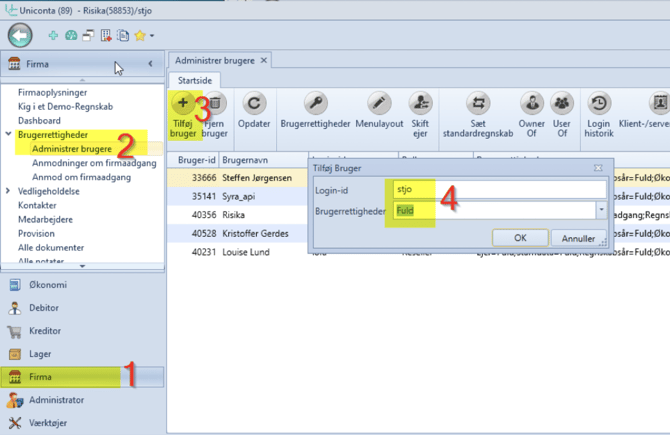
Click on "Company" in the menu.
Select "Manage users".
Click on "Add user".
Enter the login ID below and select the corresponding user rights.
Login ID: jiand@itm8.com
User rights: Full
Additional information we need
In addition to granting access, we also need your company ID (regnskabsnummer). You will find it in the top left corner of the screen, just to the right of "Uniconta (89)".
Do you have a test account where we can test the integration before we set it live in your actual account? If so, we would very much like access and the company ID for this as well.
Integration setup
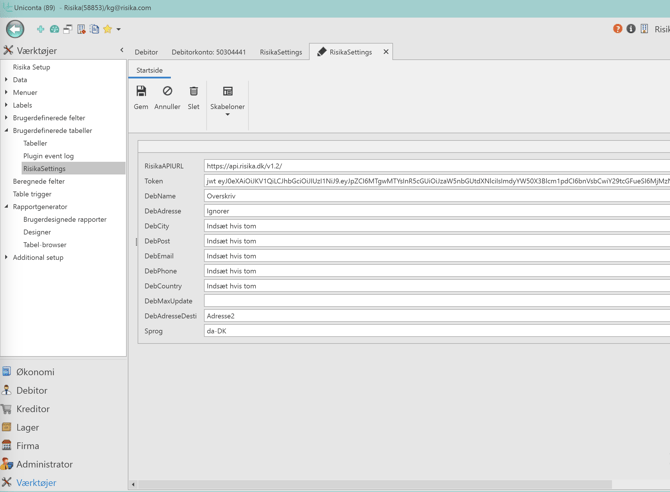
As a starting point, our Uniconta consultant will make sure to set up all the most important information for you. This primarily concerns your API token and Risika's API URL, which are essential for the integration to retrieve data from Risika and load it into Uniconta.
Should anything be missing in these fields, the following needs to be inserted:
Risika API URL: In this field, simply insert our standard URL:
https://api.risika.dk/v1.2/Token: Here you must enter your unique API token. Your token consists of a long sequence of numbers and letters. It is very important that your token starts with the letters "jwt ".
Example of a correct token:
jwt XxXxX034XXxx38x8034XX9755X56X899X0xxX866X9x98x98442X
Remaining fields
In the remaining fields, you have full control over how you want the integration to update master data for your debtors.
Do you need help?
Are you having trouble with the implementation, or do you have questions about the individual settings in Uniconta? Our team is ready to help you reach the finish line safely, so you can quickly get the full benefit of the integration.
You are always welcome to contact us:
E-mail: Write to us at support@risika.com
Live chat: You can easily reach us via the chat, which you will always find in the bottom right corner of our website.