
Say goodbye to messy email threads and lost history when sales wants to close a deal with a customer blocked by the Credit Automator. Credit Request integrates all requests and exceptions directly into the platform. Simply click "Request override" on the Credit Check page or within your own integrated system to send a request. The finance department is automatically notified and can easily assess the case using Risika's data in the settings dashboard. With one click, the request is approved or rejected, the credit limit is updated promptly, and you always have a clear record of why an exception was made.
Table of Contents
- [Submitting a Credit Request] (#indsend-kreditanmodning)
- [From the Credit Check page]
- [From your own system (API)]
- [Filling out the form]
- [Handling Credit Requests]
- [Centralized overview]
- [Reviewing the request]
- Results and Transparency
- Help or Questions?
Submitting a Credit Request
Make it easy for your sales team to request higher credit limits without wasting time on manual emails or phone calls.
From the Credit Check page
When a salesperson looks up a new or existing customer in Risika and the current credit limit is insufficient, they can act immediately. Simply click the "Request override" button directly on the company profile.
From your own system
Why switch windows? Through Risika's API, we can integrate the Credit Request button directly into your familiar work environment, such as Salesforce, HubSpot, or Business Central. This ensures your sales team stays in their flow while data flows seamlessly to finance.
Filling out the form
Clicking "Request override" opens a focused form where the salesperson enters the essential details finance needs for a quick decision:
Desired credit amount and order size.
Payment terms and contract start date.
Comments field: Add vital context (e.g., "New major framework agreement" or "Security provided by parent company").
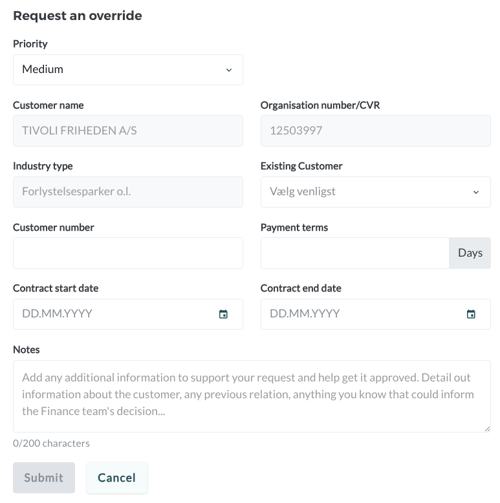
Once "Submit" is pressed, the finance department is notified immediately via email.
Handling Credit Requests
No more searching through your inbox. The finance department gets a central dashboard to manage all exceptions.
Centralized overview of requests
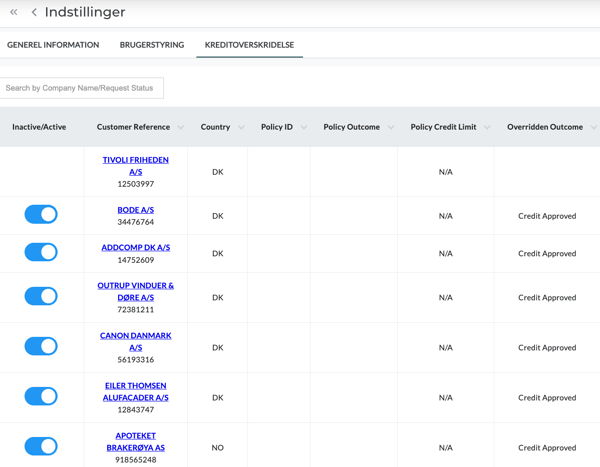
Under Settings > Credit Overrides, you will find your command center. Here you can filter by:
New requests: What requires your attention right now?
History: View previously approved or rejected requests for a full audit trail.
Reviewing the request
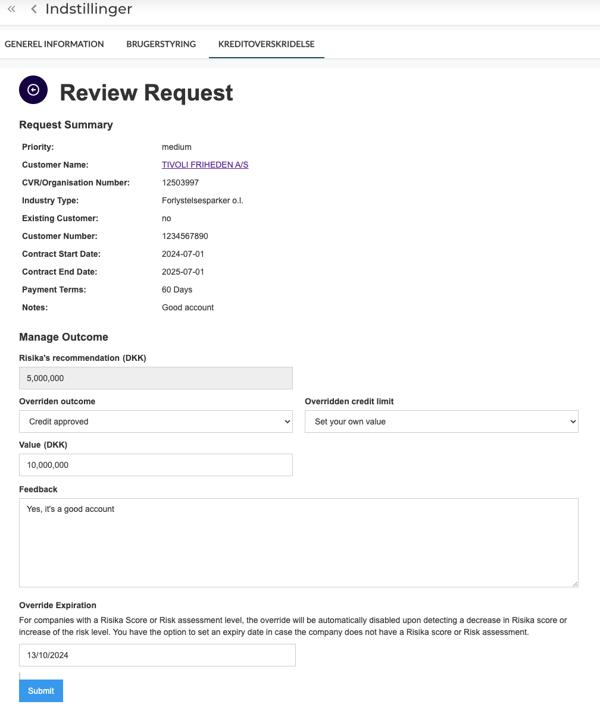
When you open a request, you are presented with a combination of the salesperson's input and Risika's real-time data. You have the full basis for your decision on one screen.
Assess the risk against the specific case.
Click "Approve" or "Reject".
The decision syncs automatically back to the platform and your integrated systems, allowing sales to close the deal instantly.
Results and Transparency
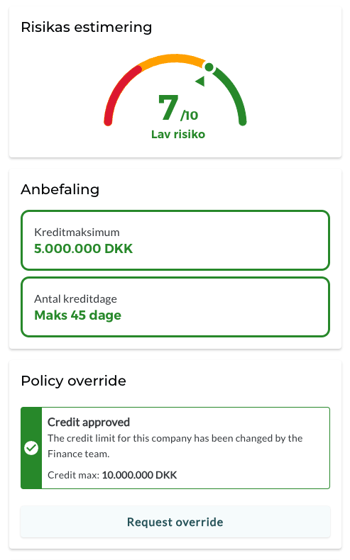
When a request is approved, the company profile is updated instantly. An approved "Override" will be clearly marked, so there is never any doubt about whether an order can be processed.
After clicking "Submit", the new credit limit will be visible on the Risika platform or directly within your CRM/ERP system if connected via the Risika API.
Need help?
Are you ready to optimize your credit process, or do you need technical assistance with API integration?
Email us: contact@risika.com
Book a walkthrough: We are happy to provide a live demo of how Credit Request can be tailored to your specific workflow.