
Overview
There are 3 ways you can delete a company from your watchlist.
Directly from the company
Open the desired company on the Credit Check page.
Click on the Monitor button in the top right corner.
Your lists will now be displayed. Here you can click Remove next to the specific lists where you want to stop monitoring the company.
From the watchlist
You can also manage and delete companies directly from within the watchlist itself.
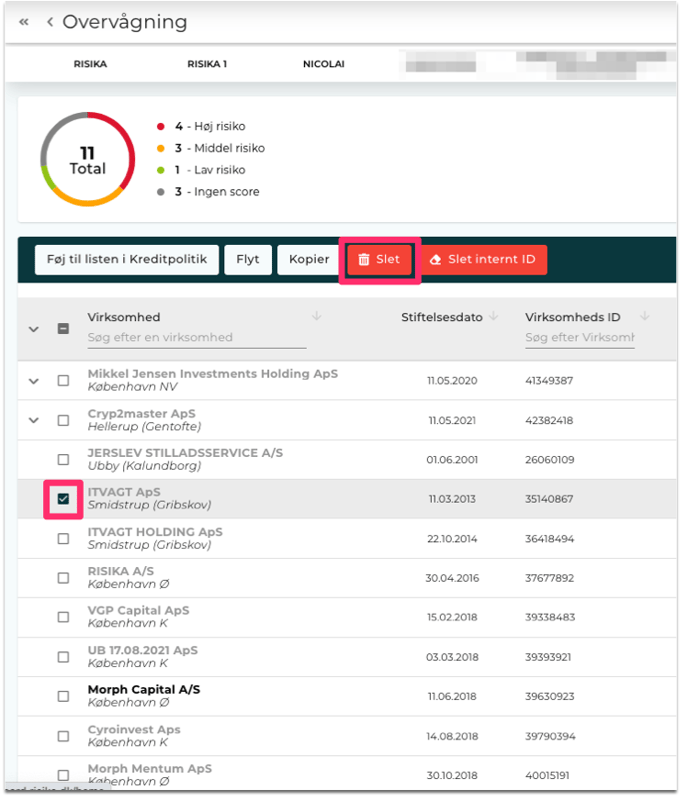
Go to the list where the company is currently being monitored.
Check the small box next to the company's name.
Click on Delete.
Delete the watchlist
If you no longer need a specific watchlist, you can delete it in its entirety.
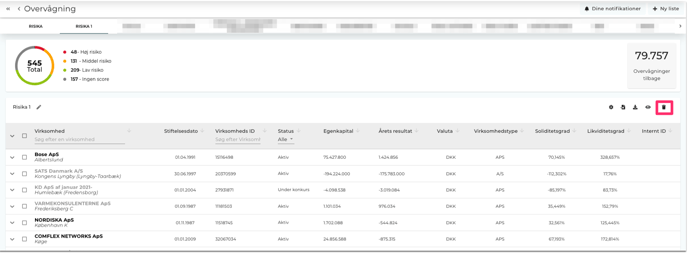
Select the list you want to delete.
Click on the trash can icon, and then confirm the deletion.
Do you need help?
Do you have any questions about this feature, or is there anything else we can help with? Please do not hesitate to contact us. You can write to us at support@risika.com or catch us directly via the live chat on our website.