
Welcome to the user guide for Risika's Uniconta integration. Before you can start using the integration, it must first be implemented. If you haven't set it up yet, you can read more about how to do it right here: (https://help.risika.dk/implementering-af-risika-i-uniconta?hsLang=da)
Oversigt
Risika layout
You can easily customize the appearance of your debtor list so that all the relevant data points available from Risika are displayed. You can either add the individual data points manually to your current list, or you can choose to download our tailored standard layout.
How to download the standard layout:
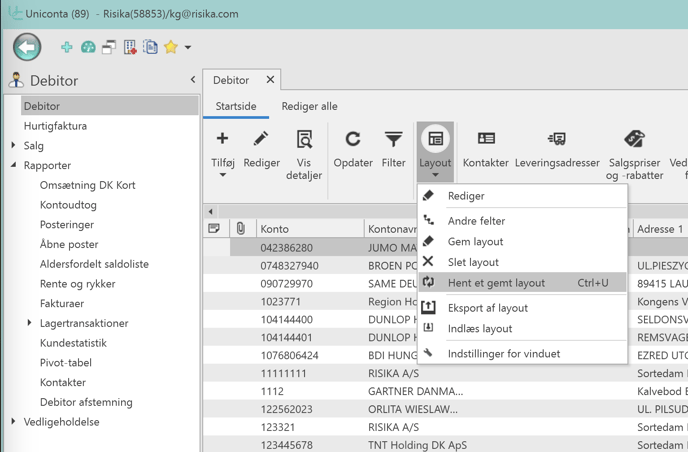
Click on "Layout" in the menu.
Select "Load saved layout".
Select "Risika".
*Your debtor list will now automatically display all the new data points from Risika.
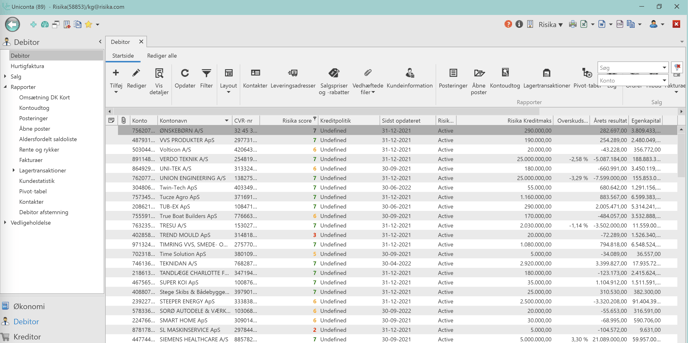
The debtor list
On the debtor list itself, you have the opportunity to gather and display all important information from both Uniconta and Risika at once. This makes it easy for you to form a quick and comprehensive overview of the status of your debtors.
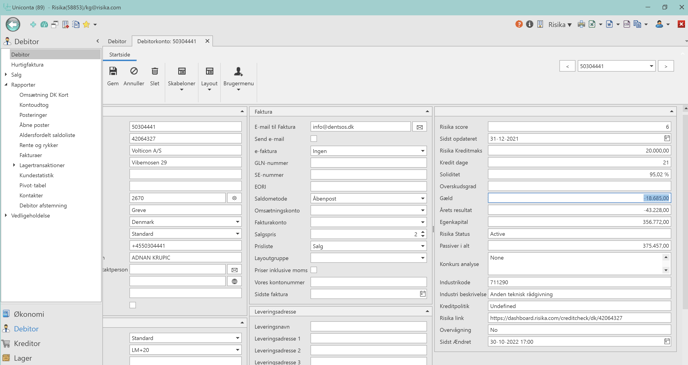
The debtor card
If you want to dive deeper into a specific customer, you can open the debtor card itself. Here you will also find all the retrieved information and key figures from Risika presented directly on the card.
Risika functions
The integration includes a number of practical functions that make it easy to manage data and debtors directly between Uniconta and Risika.
Risika update
With this function, you can update your debtors in Uniconta, ensuring you always work with real-time data. By default, the function updates all the companies currently displayed on your debtor list. If you only want to update a specific group of customers or a single debtor, simply filter the list first, and then click update.
Risika link
If you want to see even more details about a company, you can click here. The function acts as a shortcut that takes you directly to the Risika platform and opens the profile for the selected debtor.
Risika monitor
This function allows you to put companies under monitoring directly from Uniconta. As soon as you click, the customer is added to your monitoring list in Risika. If you want to know more about how our monitoring works, you can read our detailed guide here: https://help.risika.dk/funktioner#overvågning
%20(1).png?width=688&height=387&name=Masterslides%20Risika%202022%20DK%20V1%20(MASTER)%20(1).png)
Data points from Risika
Through the integration with Uniconta, you gain access to a wide range of valuable data points from Risika, keeping everything gathered in one place. Below you can see the list of data fields you can pull into your layout:
Risika score
Credit policy
Latest data update
Status
Credit maximum
Profit margin
Annual result
Equity
Solidity (Solvency ratio)
Credit days
Bankruptcy analysis
Debt
Total liabilities
Industry code
Industry description
Monitoring
Company link
Video guide
Do you want to see the integration in action? In this video, we provide a complete walkthrough of how to use the various features in the integration between Risika and Uniconta.
Do you need help?
Are you left with questions about the integration, or is there anything else we can help with? Our team is ready to assist you.
You are always welcome to contact us:
E-mail: Write to us at support@risika.com
Live chat: You can easily reach us via the chat, which you will always find in the bottom right corner of our website.