
There are hundreds of MCP servers for company data. Almost none of them cover the Nordics, and none of them give your AI a credit decision. This one does both.
Ask an AI assistant "How does [customer] look from a credit perspective?" and it will go and find out. It searches riskpilot.dk, allabolag.se, proff.no, brreg.no, asiakastieto.fi or cvr.dk, reads what it finds and writes you a summary. For a single company, that is often good enough.
We tried it ourselves, and here is what happens along the way. The search returns eight different pages for the same registration number, one per branch. The company has three secondary names. One news site reports a new director, another still shows the old one. The credit rating sits behind a paywall. And the search results contain no actual figures, so the AI has to open the pages one by one.
The AI writes an answer anyway. It sounds confident. But it is built on whatever it managed to read, in the order it found it.
Six things web search cannot give your AI
- It does not know where the true data lives. Branches, secondary names, group companies and news sites all look like credible sources. The AI has to work out that eight different pages describe the same company before it can read anything. This is where most wrong answers start.
- No credit score. Public sites show financial figures, not an assessment. A few free sites do display something that looks like a score. But this is regulated across the Nordics: in Denmark, operating a credit information agency and publishing credit assessments requires authorisation from the Danish Data Protection Agency under the Danish Data Protection Act, and Sweden, Norway and Finland have equivalent credit information laws. A score from an unlicensed site is not subject to the statutory requirements for source verification and documentation, and the AI cannot tell the difference. So it infers a conclusion from whatever numbers it caught, and infers a different one next time.
- No credit limit and no payment terms. How much credit should you extend, and on what terms? That is not published anywhere, so the AI either makes up a number or declines to give one.
- No history and no explanation. A set of accounts is one snapshot. What matters is how the company's risk has developed over the last three years, and what is pulling the score up or down today. Web search cannot answer that, because it has never been on a web page.
- Not the same depth, not the same format. Public sites show a selection of figures from the latest accounts. Full income statements and balance sheets for every year, ratios calculated the same way for Denmark, Sweden, Norway and Finland, cross-border ownership chains and group structures sit behind logins or are not public at all. In Sweden, Norway and Finland, even the original annual reports are not freely online.
- It costs time and tokens. One lookup is five to ten searches and page reads. For one company that is fine. For 30 customers in a debtor list it is a coffee break per company, and the output is still not consistent.
The Risika MCP server replaces the web search with a single call. The AI pulls score, credit limit, ratios, ownership and history directly from Risika in under a second, in the same format for all four countries, and answers with the figures you already use in finance today.
What is an MCP server?
The Model Context Protocol (MCP) is an open standard that lets AI assistants connect to external data sources and tools. Think of it as a shared socket: build it once and it works in every AI client that speaks MCP, including Claude, ChatGPT, Gemini and Cursor.
Before MCP you either pasted data into the chat, wrote code against our REST API, or built an integration from scratch. With MCP you just ask, and the AI picks the right tool itself.
What the Risika MCP server does
The server gives the AI 55 tools to choose from based on your question. You do not need to know them. You get:
- The right company by name or registration number in Denmark, Sweden, Norway, Finland and the Faroe Islands, including secondary names, historical names and branches. One search, one legal entity.
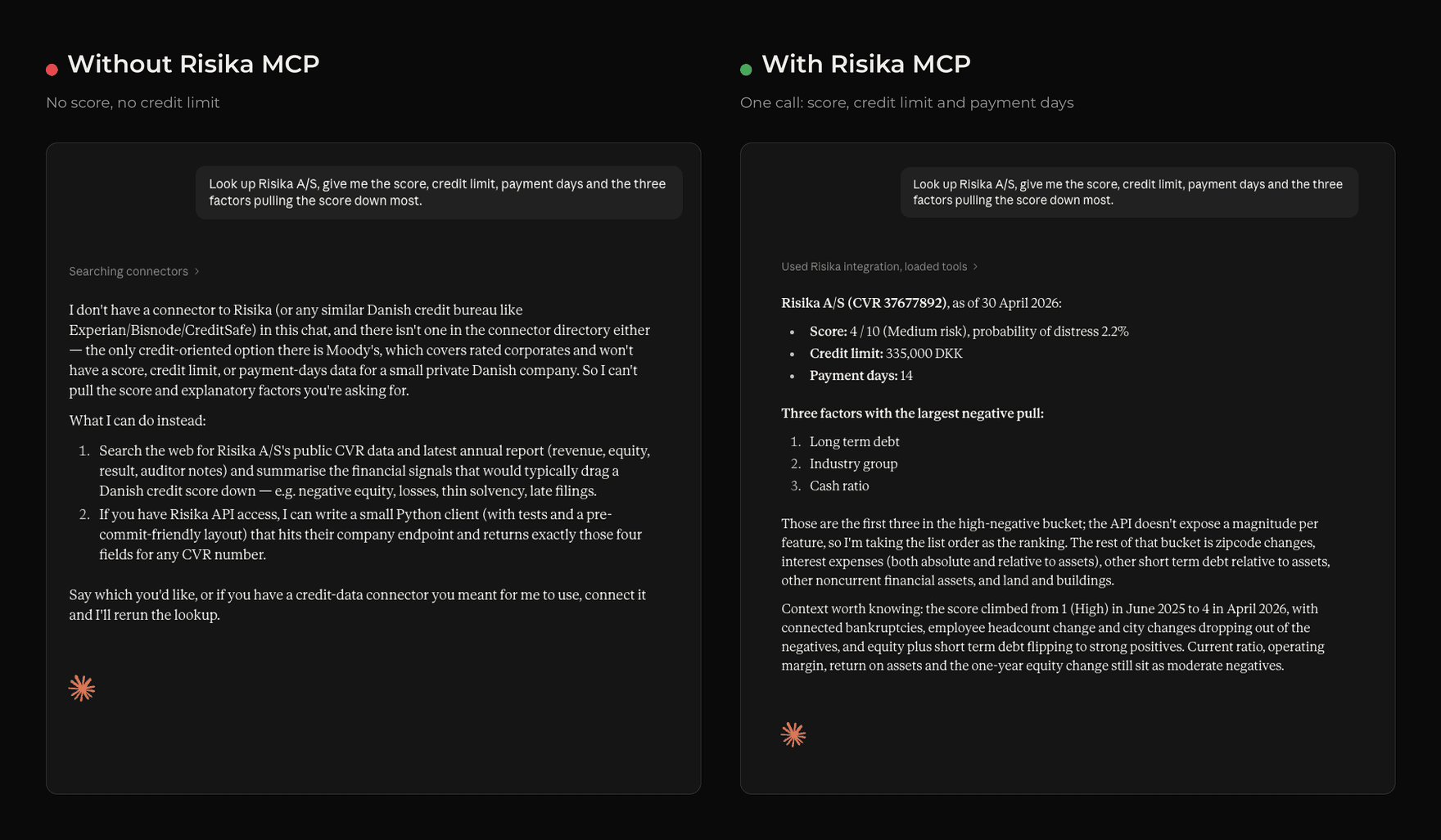
- Credit assessment with a score from 1 to 10, probability of distress, recommended credit limit and payment days, the factors pulling the score up and down, and the score history over time.
- Your own credit policy, so the AI assesses a customer against your rules rather than its own.
- Financials and ratios for every year, full income statement and balance sheet, calculated consistently across countries.
- Owners, management and group structure, the full ownership chain up and down, across borders, with every role and its dates.
- Master data, history and warnings, including name and address changes, capital changes, and registered debt and property for Danish companies.
- Monitoring of a portfolio, surfacing the changes that need action.
- Batch lookups of up to 500 companies per call, so a debtor list does not become 500 lookups.
The tools are built on the same endpoints as our REST API. See the API documentation for the underlying data fields.
How to install the Risika MCP server
The server needs a Risika API token. It comes with API access, and your account administrator can create one in the platform. Not a customer yet? Book a walkthrough, or use riskpilot.dk for single lookups in the meantime.
Claude Desktop
Download the bundle below, double click the file and paste your token when Claude asks. It takes under two minutes.
Cursor, Claude Code, VS Code, Gemini CLI, Windsurf and Cline
Same bundle, short config. Rename risika-mcp.mcpb to risika-mcp.zip, extract it to a permanent folder, and add the server to your client's MCP config with the path to src/index.js:
{
  "mcpServers": {
    "risika": {
      "command": "node",
      "args": ["/path/to/risika-mcp/src/index.js"],
      "env": { "RISIKA_TOKEN": "your-token" }
    }
  }
}
Reload the client and the 55 tools are available. The config file lives at ~/.cursor/mcp.json for Cursor, .vscode/mcp.json for VS Code, and the equivalent for the others. Everything the server needs is inside the bundle, so there is no npm install.
Three prompts to try first
Credit check before quoting: "Look up [company], give me the score, credit limit, payment days and the three factors pulling the score down most."
KYC and management: "Who owns [company], who is on the management team and board, and when did they join?"
Portfolio overview: "Here are 20 registration numbers from our debtor list. Which ones have dropped in score over the last 12 months?"
The first takes five to ten web searches without MCP and still does not return a credit limit. The second is where web search usually gets it wrong, because news sites and registries update at different times. The third is not realistically possible without structured data.
Where the limits are
We write honestly about our own products, so here is what you should know before building anything important on top.
The AI retrieves, it does not assess. The score, credit limit and ratios come from Risika. What the AI does on top, wording, comparison, summary, is still a language model and can misread. Use it to get an overview fast, not as the sole basis for a credit decision.
If you just need one company, use riskpilot.dk. It is our own free lookup site for companies in Denmark, Sweden, Norway and Finland, and it is faster than asking an AI to search. The MCP server is for when the answer needs to land inside the tool you already work in, or when it is 30 companies rather than one that need assessing.
Web search is still better for news. If the company was in the press yesterday, web search finds it and the MCP does not. The combination is the right setup: registry data from Risika, context from the web.
Data leaves your AI client. When Claude or Cursor calls the Risika MCP, the request goes to Risika's API and the answer comes back to the client. Check your AI vendor's terms for what happens to data in the chat. The lookup itself at Risika is covered by our standard terms and ISAE 3000 assurance, the same as the REST API.
Usage is metered. Every lookup through MCP is an API call and is billed as one. An AI that eagerly looks up 500 companies costs the same as 500 calls from your own system. The server does not impose a cap of its own, but it does keep count: ask the AI to check your usage and plan limits before it starts. Ask, for example, "How many lookups have we used on our agreement?" and it fetches the answer instantly. Two good habits from day one: use the batch tool for lists instead of 500 individual lookups, and add a line to your AI instructions telling it to check with you first if a task needs more than, say, 50 lookups.
MCP or REST API?
If you are building something that runs automatically and at scale, use the REST API. It is documented, versioned and built for that. The REST API also gives you the original annual reports for companies in all four countries. In Sweden, Norway and Finland those are not freely available online, so the API is the only route for an AI. The MCP server does not have that tool yet. Read our guide to the CVR API (in Danish) if you are considering going straight to the registry.
If a salesperson, a credit controller or an analyst just needs an answer now, inside the tool they are already working in, MCP is the way. It is not either or. Most end up with both.